Everything you need to launch, manage, and measure successful programs—all in one powerful, intuitive platform.
Centralized profiles holding all content and activities for the applicant. This includes submission details, file uploads, communication, scoring results, and any additional forms and tasks post selection
Real-time visibility into application progress helps applicants stay informed and engaged while minimizing confusion and follow-up emails.
Centralized profiles holding all content and activities for the applicant. This includes submission details, file uploads, communication, scoring results, and any additional forms and tasks post selection
Visual progress tracking and validation checks guide applicants through requirements, reducing incomplete or invalid submissions.
Applicants can invite collaborators to contribute to shared submissions, enabling team-based or multi-author applications without manual coordination.
Responsive design ensures applications are accessible on any device, increasing accessibility and participation across demographics.
Built-in accessibility standards ensure applications are usable by individuals with disabilities and meet compliance requirements.
Collect, organize, and view all applicant files — transcripts, references, resumes, tax documents, and more — directly within the platform. Embedded document viewing lets staff and reviewers access everything side-by-side with the application, without downloading, searching shared drives, or matching files manually.
Collect application fees securely and seamlessly as part of the submission flow — no third-party payment tools or manual tracking needed.
Guide applicants through a quick eligibility check before they begin — saving them time and saving your team from processing unqualified submissions. Configurable screening criteria ensure only eligible applicants move forward into the full application.
Automate the entire reference process — from sending requests to recommenders, to tracking completion status, to logging submitted letters directly on the applicant's profile. No more chasing down references over email or matching letters to applications manually.
.avif)
Run programs on your schedule — whether it's a single deadline, rolling admissions, or an always-open intake — all from the same flexible configuration.
Run multiple programs simultaneously from a single account — each with its own forms, timelines, review teams, and settings.
Run multiple programs simultaneously form a single account — each with its own forms, timelines, review teams, and settings.
Launch new progrmas fast with self-guided setup, industry-proven templates built on best practices, and the ability to clone and archive programs year over year.
Organize submissions into meaningful groupings — by category, division, region, or cohort — to ensure fair comparisons and support complex program structures. Create custom groups and automatically assign submissions based on form logic.
Each category can have its own eligibility rules, forms, and scoring criteria, eliminating one-size-fits-all limitations.
Logic-driven eligibility checks ensure only qualified applicants proceed, reducing review volume and administrative overhead.
Collection additional information at any point in the process — reference requests, transcript uploads, acceptance confirmations, impact reports, fun disbursement forms, and more — triggered automatically or on demand without disrupting the core application.
Organizations can collect acceptance confirmations, reports, or compliance documents after selection without external tools.
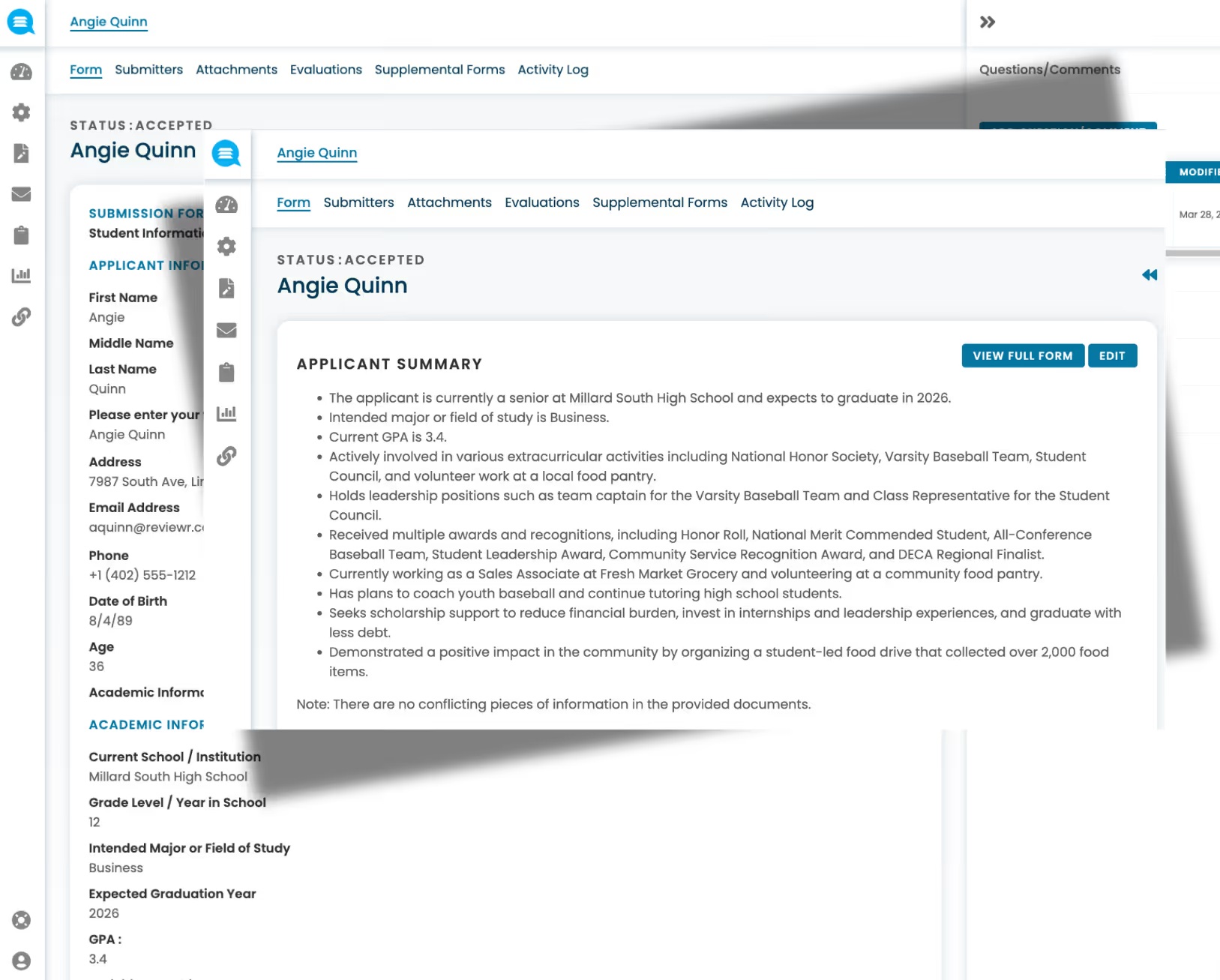
Access complete applicant details and supporting materials in one place — with the ability to make administrative edits, grant applicants permission to revise their submissions, and manage statuses across every stage of the process.
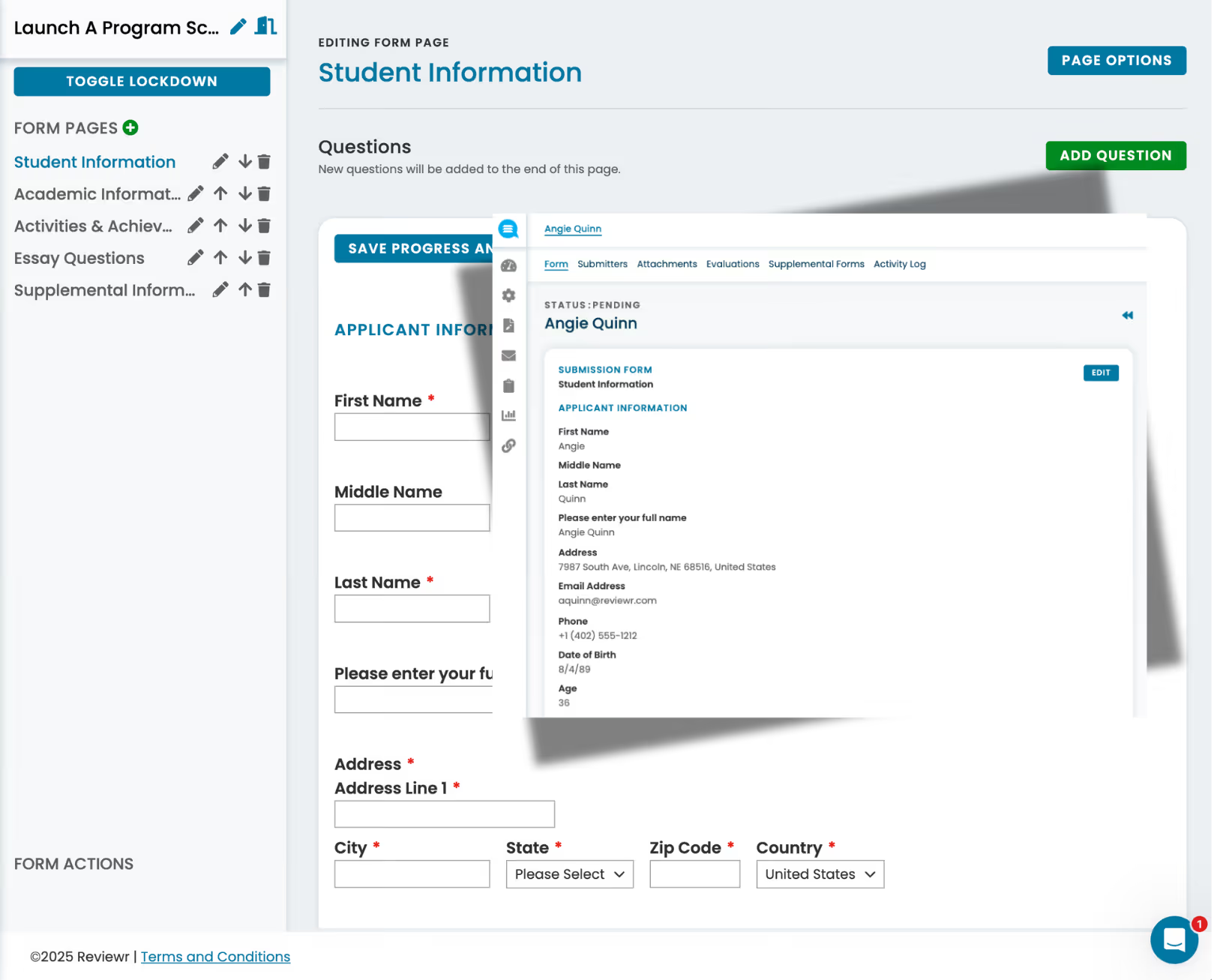
Create application forms, scorecards, and intake forms visually — no coding or IT support requried. Just drag, drop, and publish.
Design detailed scoring rubrics with custom criteria, weighted categories, and multiple score types — all built within the same intuitive builder used for application forms. Ensure every reviewer evaluates agains thte same consistent, structured standards.
Show or hide fields, sections, or entire pages based on applicant responses — so every appplicant sees only what's relevant to them.
Set field-level requirements and validation to catch errors before submission, ensuring clean, complete data from the start.
Collect any type of file as part of the submission process — organized, stored, and linked directly to each applicant's record for easy access by staff and reviewers.
Review uploaded files directly within the platform — side-by-side with scorecards — without downloading or switching between tools.
Assign specific submissions to specific reviewers when you need precise control over who evaluates what
Organize reviewers into committees or panels to structure evaluation across teams, divisions or review stages.
Automatically distribute submissions across reviewers at random to balance workloads and reduce assignment bias.
Each reviewer gets a dedicated portal with their assigned submissions, deadlines, and progress — keeping the experience focused and efficient.
Randomize the order submissions appear for each reviewer, eliminating order bias and ensuring fairer evaluations.
Require reviewers to disclose conflicts before accessing submissions, with automatic enforcement to prevent compromised evaluations.
Control exactly what reviewers see by redacting names, demographics, or any identifying information — enabling truly blind evaluation.
View applicant details including forms, files, and notes side by side with structured scoring rubrics — keeping all context in one place during evaluation.
Score submissions using structured rubrics with customizable criteria and weighting, ensuring consistent and transparent evaluation.
Allow reviewers to rank submissions against each other rather than scoring individually — ideal for competitive selection programs.
Automatically detect and adjust for strict or lenient scoring patterns across reviewers.
Automatically calculate averages, weighted totals, and aggregate scores across reviewers — no manual spreadsheet work needed.
Enable committees to deliberate together with sharednotes, consensus views, and multi-stage approval workflows before final decisions are made.
Move top submissions into finalist pools using configurable score thresholds, cut-lines, and tie-breaking rules — automating borderline decisions with clear, defensible criteria.
Record final selection decisions with approval workflows, ensuring every award has a documented, defensible path from review to outcome.
.avif)
Build reusable email templates that auto-populate with applicant names, program details, statuses, and more — personalized at scale
Trigger notifications automatically based on program events — submissions received, reviews completed, deadlines approaching, decisions made.
Send individual or bulk messaging to applicants and reviewers with one-off emails or email templates
Send automated messages to both applicants and reviewers with in progress tasks up until a deadline.
Send decision letters — acceptances, rejections, waitlists, and award notifications — directly from the platform with one click.
.avif)
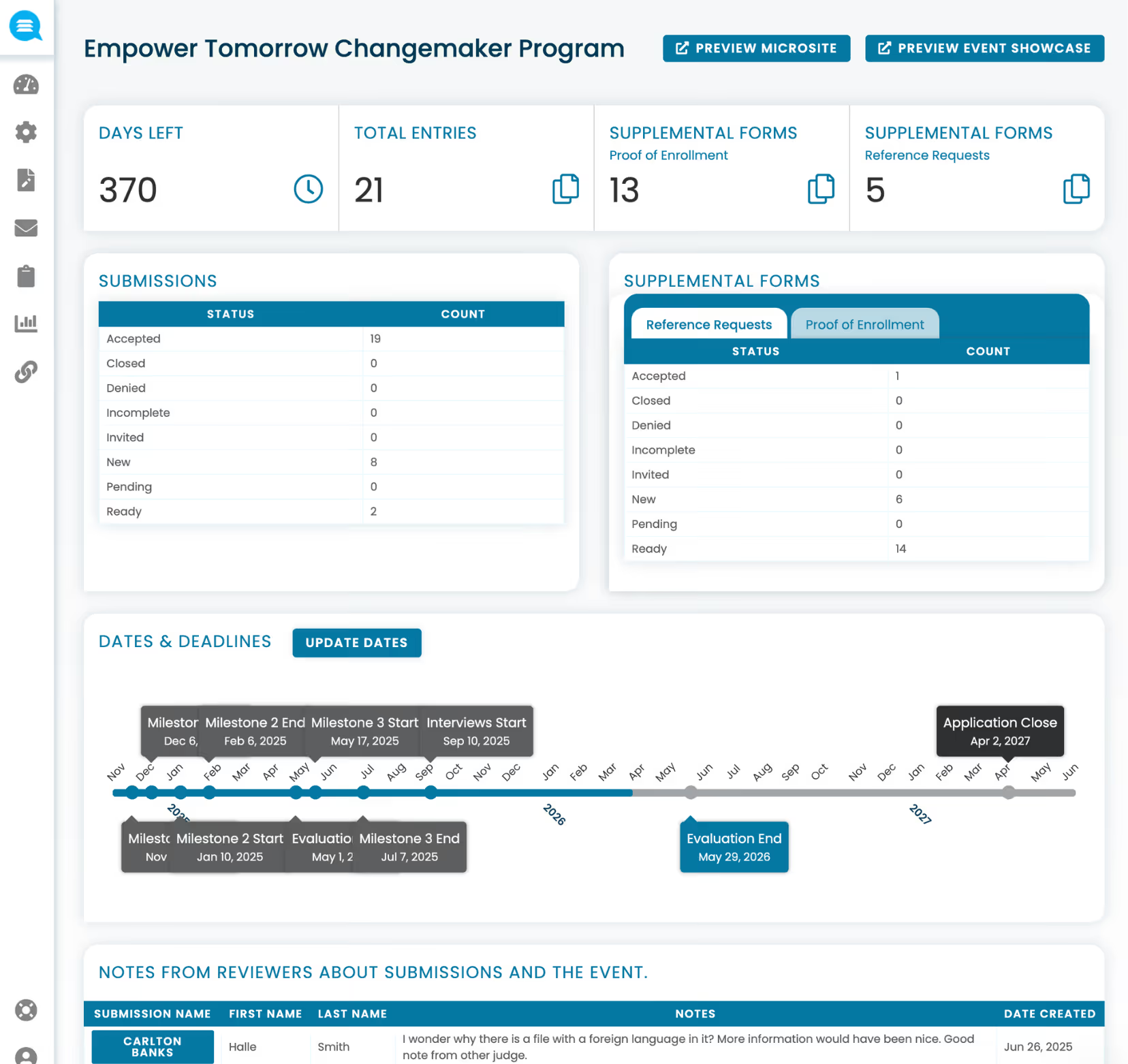
Get a live overview of program health — submission volume, review progress, and key metrics — at a glance from a central dashboard.
Monitor which reviewers have completed their evaluations and which are lagging behind, so you can nudge before deadlines hit.
See how work is distributed across your review team — identify overloaded reviewers, track participation rates, and balance future assignments.
Understand how submissions flow through each program stage — where bottlenecks form, where drop-off happens, and where decisions are pending.
Build your own reports by selecting the fields, filters, and groupings that matter most — tailored to your program's unique reporting needs.
Export any report in CSV or PDF format for board presentations, compliance documentation, or offline analysis.
Track and report on program outcomes — connecting awards to real-world results so you can demonstrate impact to leadership, funders, and stakeholders.
.avif)
Transform lengthy, multi-part submissions into concise reviewer briefs — pulling key qualifications, essay highlights, and supporting document details into a single overview so reviewers can evaluate faster and more consistently.
Automatically screen submissions for completeness, essay length, and response quality — flagging entries that fall short of requirements before they ever reach a reviewer.
Use AI to match applicants to the right programs and verify eligibility criteria automatically — reducing unqualified submissions and routing applicants where they're the best fit.
Detect strict and lenient scoring patterns across your review panel and normalize results — ensuring every submission is evaluated on a level plaing field regardless of which reviewer it was assigned to.
Identify AI-generated content and flag plagiarized material across essays and written responses — protecting program integrity and ensuring authentic submissions from every applicant.
Extract data from uploaded documents like transcripts, tax forms, and references — enabling form prefill for applicants and cross-validation against submitted responses to catch discrepancies and improve data accuracy.
Automatically redact sensitive or identifying information from essays and uploaded documents to enable blind review — without manual effort from staff.
AI-assisted evaluation of submission quality and alignment to program goals — providing initial ranking recommendations to support reviewer decision-making.
Maintain an ongoing relationship with award recipients — tracking their journey, communications, and milestones beyond the initial selection
Automate the offer process — send award notifications, collect acceptances or declines, and manage conditional requirements before disbursement.
Track award budgets, disbursement schedules, and payment status in one place — ensuring financial accountability and clear audit trails.
Collect progress reports, compliance documentation, and outcome data from recipients on a recurring schedule — all within the platform and tied to the original submission.
Manage multi-year awards with renewal workflows — tracking recipient eligibility, progress, and ongoing requirements year over year without starting from scratch each cycle.
.avif)
Add and manage staff, reviewers, and administrators with role-based access controls that define what each user can see and do.
Go beyond basic roles with fine-grained permissions — restrict reviewers to only their assigned submissions while giving staff broader program visibility.
Control visibility down to the individual field — deciding exactly which data points each role can access, supporting blind review and PII protection.
Every action in the platform is logged — who did what, when, and where — providing a complete audit trail for compliance and accountability.
Enable single sign-on so users can access Reviewr through your organization's existing identity provider — simplifying login and strengthening security.
.avif)
Built-in safeguards to protect sensitive applicant data — including access restrictions, data retention policies, and privacy-first architecture
All data is encrypted both during transmission and while stored, meeting enterprise security standards for sensitive information.
Independently audited and certified to SOC 2 Type II standards, demonstrating ongoing commitment to security, availability, and data integrity.
Built for reliability with monitored uptime, redundancy, and disaster recovery — ensuring your programs and data are accessible when you need them.
Data hosted on secure, US-based cloud infrastructure with transparency into where and how your data is stored to meet organizational and regulatory requirements.
Connect Reviewr to your organization's identity provider — enabling staff and reviewers to log in securely through existing credentials without managing separate accounts.
Accept application fees and process payments securely through built-in payment provider integrations — no third-party setup required.
Connect Reviewr to your existing systems with API access — enabling custom data flows, syncs, and integrations with your tech stack.
Push real-time data to external systems whenever key events happen — like a submission received, a review completed, or a decision made — keeping your tools in sync automatically.

The all-in-one platform for managing scholarships, grants and awards programs.